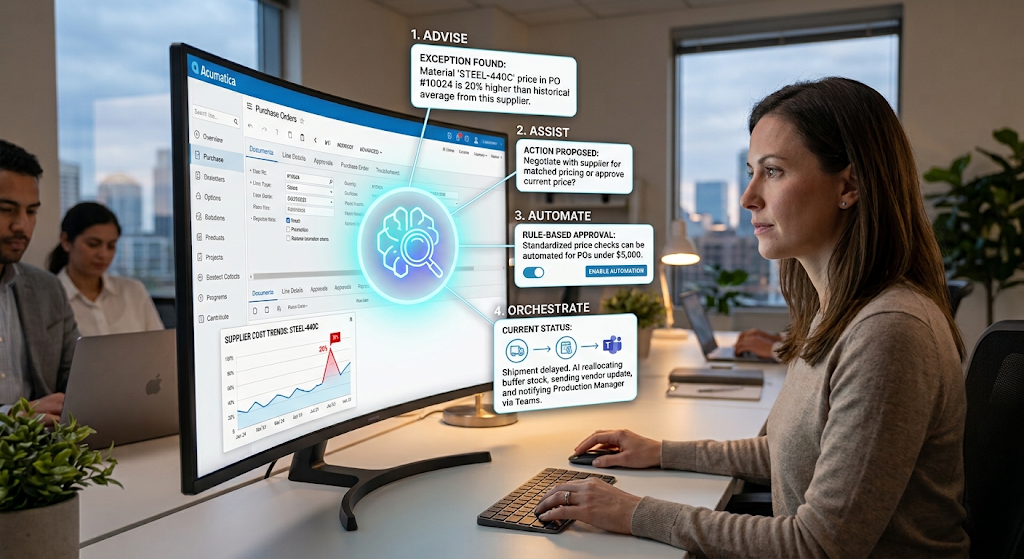
What Is AI ERP? The 40-Second Answer
AI ERP is enterprise resource planning software with artificial intelligence built into day-to-day workflows. It typically includes four capabilities: advise (monitor data and flag issues), assist (answer questions and propose actions), automate (run repeatable workflows), and orchestrate (manage complex processes end to end while escalating only true exceptions).
Most vendors talk about “AI” as if it were one thing, but an alert that spots an unusual invoice is very different from an agent that can steer month-end close across AR, AP, inventory, and the general ledger.
For small and midsize businesses, cutting through that ambiguity matters. You do not need every cutting-edge feature on day one. You need to understand which capability fits which process, how much control you keep, and how solutions like Acumatica, implemented by a partner such as Aqurus, can embed AI into everyday work instead of adding yet another disconnected tool.
Advise: AI That Spots Issues Before You Do
Advise is the capability where AI continuously watches your data and surfaces what matters, without anyone having to run a report or ask a question first.
In practical terms, an advise engine can scan thousands of transactions to find the handful that look unusual. For example, it might flag that one supplier’s lead time has quietly risen by about 40% over the last quarter right when a new purchase order for a critical part hits the approval queue. The approver sees the order and the risk together, not as separate numbers buried in different screens.
Behind the scenes, this usually relies on machine learning models trained on your own historical data, not just generic industry averages. That makes “normal” different for each customer, item, or vendor, and makes anomalies meaningful.
Vendors like Acumatica use anomaly detection and dashboard alerts to deliver this advise capability directly inside the ERP, so planners, controllers, and operations leaders see the signal inside the same workspace where they already work.
Assist: AI You Can Talk To Inside Your ERP
Assist adds a conversational layer on top of your ERP data. Instead of opening multiple reports or asking IT to build a query, you ask a question in plain language and get an answer in seconds.
A sales or operations manager might type, “What is our stock coverage for our top ten selling items in Calgary?” The assist layer interprets the request, queries live data, and presents a clear answer, often with charts, filters, and recommended next steps. It may even offer to draft a purchase order or transfer request that you can approve or edit.
The key difference between advise and assist is who initiates. Advise pushes information when the system sees something important. Assist waits for you to ask and then responds, often suggesting follow-up actions.
Modern assistants, like Acumatica’s AI Assistant, can sit directly inside ERP screens, so a buyer reviewing inventory does not have to jump out to a separate chatbot. As industry analysts point out, the next generation of ERP is about turning insight into co-ordinated action, and assist is a big step toward that goal.
Automate: AI That Runs Repeatable ERP Workflows
Automate focuses on repeatable work with clear triggers and outcomes. You define the rules once, and the system executes them every time conditions are met, combining classic automation with AI where judgment is needed.
Take accounts payable as a concrete example. When an invoice arrives, the system can read it, match it to the purchase order and receipt, flag discrepancies, and route it for approval, without anyone re-keying numbers. If everything matches, the invoice can move straight to scheduled payment. Only exceptions reach a human inbox.
This blend of deterministic rules and probabilistic AI is what separates simple macros from robust automation. Fixed rules handle steps that must always run the same way. AI steps in for tasks like interpreting documents, recognizing patterns, or deciding whether a variance is significant.
Vendors such as Xero describe how this approach speeds up reconciliations and recurring entries. Acumatica takes a similar path with no-code workflows and AI Automation, letting SMBs automate AP, order management, and inventory tasks while keeping humans in the loop for edge cases.
Orchestrate: AI That Owns Outcomes Like Month-End Close
Orchestrate is the most advanced of the four capabilities. Instead of automating a single task, AI tracks and manages an entire multi-step process end to end, only involving people when their judgment is genuinely required.
Month-end close is a classic orchestrate candidate. Reconciliations, accruals, allocations, intercompany eliminations, and approvals all connect across AR, AP, inventory, projects, and the general ledger. An orchestrating agent can see this as one continuous process, automatically moving each step forward, updating status, and surfacing only the exceptions that block progress.
This aligns with the industry shift described by Diginomica: from counting minutes saved on individual tasks to measuring outcomes like “days to close” or “cash flow accuracy.”
Very few ERP systems deliver full orchestration in production today, but leaders like Acumatica are engineering tools such as tool orchestration and close-period agents to get there. For SMBs, the practical takeaway is to look for vendors that can already orchestrate at least one or two high-value processes, then expand over time.
Automate: AI That Runs Repeatable ERP Workflows
Automate focuses on repeatable work with clear triggers and outcomes. You define the rules once, and the system executes them every time conditions are met, combining classic automation with AI where judgment is needed.
Take accounts payable as a concrete example. When an invoice arrives, the system can read it, match it to the purchase order and receipt, flag discrepancies, and route it for approval, without anyone re-keying numbers. If everything matches, the invoice can move straight to scheduled payment. Only exceptions reach a human inbox.
This blend of deterministic rules and probabilistic AI is what separates simple macros from robust automation. Fixed rules handle steps that must always run the same way. AI steps in for tasks like interpreting documents, recognizing patterns, or deciding whether a variance is significant.
Vendors such as Xero describe how this approach speeds up reconciliations and recurring entries. Acumatica takes a similar path with no-code workflows and AI Automation, letting SMBs automate AP, order management, and inventory tasks while keeping humans in the loop for edge cases.
AI ERP for SMBs: FAQs for Choosing the Right Solution
A clear FAQ helps answer common buyer questions and supports answer engines.
What is AI ERP?
AI ERP is cloud ERP software with intelligence built into workflows, not bolted on as a separate app. It uses advise, assist, automate, and orchestrate capabilities to monitor data, answer questions, run workflows, and manage complex processes, while keeping people in control of key decisions.
Do I need all four capabilities right away?
No. Most SMBs start with advise and automate, then add assist and orchestrate as they gain confidence. A manufacturer might begin with anomaly detection on invoices and automated AP, for example, and later explore conversational assistants and orchestrated month-end close.
How is this different from basic automation?
Traditional automation follows fixed rules and runs the same way every time. AI adds judgment, reading documents, classifying anomalies, or suggesting next steps. The strongest ERP solutions combine both: rules for predictable steps, AI for exceptions and interpretation.
Where does Acumatica fit, and how can Aqurus help?
Acumatica delivers all four capabilities through embedded features like Anomaly Detection, AI Assistant, AI Automation, and tool orchestration. Aqurus helps Western Canadian SMBs implement these tools in real-world processes, from order-to-cash to month-end close, so AI reduces workload instead of adding noise.
How do we get ready for AI ERP?
Start by cleaning key data (customers, suppliers, items), documenting core processes, and identifying one or two high-friction workflows, such as AP or inventory replenishment. Then work with your ERP partner to map those processes to advise, assist, automate, or orchestrate capabilities that fit your risk tolerance and goals.