Sage 100: Automate Order Processing w/ Integrated eCommerce, Credit Card Processing, Sales Tax Compliance, Pick, Pack, Ship
Post Sage Summit Collaborative Webinar
6 min read
Adrian Montgomery Fri, Jul 31, 2026 @ 12:07 PM
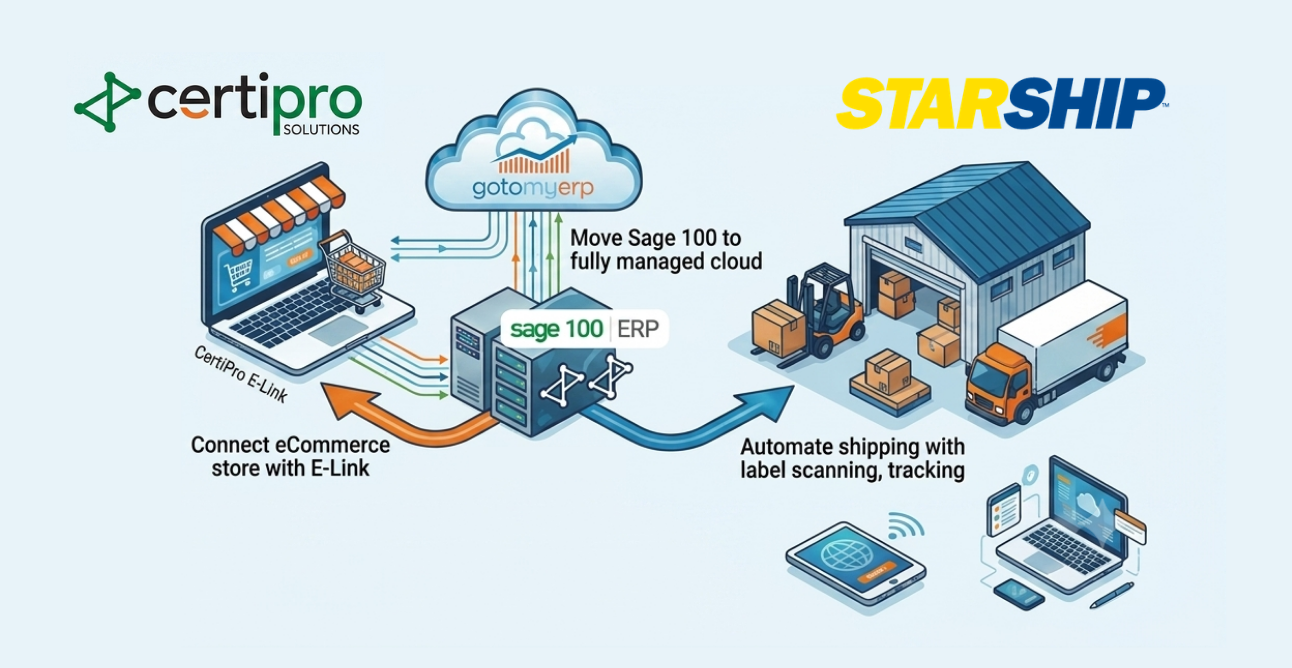
Modernizing Sage 100 for faster fulfillment means combining cloud hosting, real-time ecommerce integration, and automated shipping into one connected stack. This unified approach eliminates re-keying, reduces shipping errors, speeds up order processing, and gives customers accurate inventory and tracking information without phone calls or email back-and-forth.
If you are running Sage 100 on aging servers, you probably see the symptoms every day. Users complain about slow performance, VPNs are unreliable, and remote workers struggle to access the system during peak times. When your team has to wait for screens to load, basic tasks like entering sales orders or checking inventory take minutes instead of seconds.
Date: Thursday, August 13, 2026
Time: 11 AM PT / 2 PM ET - 1 hour
Disconnected ecommerce and shipping make that pain worse. Orders arrive via web store, email, or PDF and then get re-keyed into Sage 100. Each manual touch is a chance to mis-type an address, pick the wrong item, or miss special pricing. One distributor we spoke with found that roughly 3–5% of orders contained data entry mistakes before they integrated systems.
Inventory accuracy also suffers. Your ecommerce site may show items as “in stock” even though Sage 100 knows they are reserved for other orders. That leads to backorders, split shipments, and support tickets from frustrated customers. When ecommerce, ERP, and shipping are out of sync, every late or incorrect shipment erodes trust and margins.
Finally, customer service feels the impact. Without real-time data, your team scrambles through Sage 100, carrier portals, and email threads just to answer a simple “Where is my order?” question. Instead of focusing on selling, you spend hours chasing information that should be automatically available.
Moving Sage 100 into a managed cloud gives you the infrastructure needed to support always-on ecommerce and shipping integrations. A provider like gotomyerp hosts your existing Sage 100, customizations, and add-ons in a secure environment while enabling fast, reliable remote access.
Instead of investing in new servers every few years, you shift to a predictable monthly operating expense. Cloud hosting providers handle operating system patches, backups, and monitoring so your internal IT team can focus on projects with direct business impact. As Microsoft phases out Windows 10 support, many Sage 100 users are accelerating cloud plans to avoid running mission-critical ERP on unsupported platforms.
Performance is another advantage. Well-architected cloud environments can allocate CPU and memory resources dynamically, so busy month-end periods do not grind your team to a halt. Users log in from any location over a secure connection and experience Sage 100 as if it were running locally, even when multiple integrations are active.
Security also improves. Managed hosts typically enforce multi-factor authentication, encryption, and access controls at the infrastructure level. Continuous monitoring helps detect suspicious activity early. For regulated industries or businesses handling sensitive customer data, this level of protection is difficult and expensive to replicate on-premise.
Most importantly, cloud hosting provides a stable, high-availability platform for ecommerce and shipping integrations. When Sage 100 is accessible with consistent performance, tools like ecommerce connectors and shipping software can reliably push and pull data in real time without timing out or dropping connections.
The next step is to synchronize Sage 100 with your ecommerce platform so orders, customers, products, and inventory move automatically between systems. Tools similar to CertiPro’s E-Link, described in their ecommerce integration guide, are designed to keep Sage ERP and online storefronts in lockstep.
At a minimum, your integration should push customers, products, inventory, and pricing from Sage 100 to your ecommerce platform. That ensures the storefront only displays items you actually carry, with up-to-date stock levels and customer-specific pricing. When a buyer logs in, they see the same information your inside sales team sees in Sage 100.
On the return path, ecommerce orders should flow directly into Sage 100 as sales orders without manual re-keying. That eliminates duplicate data entry and dramatically reduces order errors. In one case study, a mid-sized distributor cut order processing time by nearly 50% after automating this step, freeing staff to focus on cross-sell and upsell activities.
A well-designed integration also handles order status and fulfillment updates. As shipments go out and invoices are posted in Sage 100, key fields—such as shipment date, tracking number, and balance due—can be pushed back to the ecommerce portal. Customers can then log in to check order status and download invoices, instead of calling your team.
For B2B sellers, customer-specific catalogs and complex pricing structures are essential. Look for integrations that support contract pricing, volume breaks, and customer groups pulled directly from Sage 100. That way, your ecommerce channel reinforces existing relationships instead of undercutting them with generic web prices.
Once Sage 100 and ecommerce are connected, the next bottleneck is usually shipping. Multi-carrier shipping software like V-Technologies’ StarShip, covered in an ERPVAR guide, plugs directly into Sage 100 so your warehouse can rate-shop and ship without leaving the ERP workflow.
In a typical process, a warehouse worker scans a picking sheet or packing slip barcode tied to a Sage 100 sales order. The shipping system instantly pulls line-item details, weights, and ship-to addresses from Sage, eliminating manual data entry at the shipping station. This alone can remove dozens of keystrokes per shipment.
The software then displays live, negotiated rates from multiple parcel and LTL carriers side by side. Your team can choose the lowest-cost option that meets the delivery promise, or you can apply business rules—such as preferring certain carriers for specific regions or product types. Over hundreds of shipments, even a small reduction in average freight cost adds up.
When the shipment is processed, labels and Bills of Lading are generated automatically. The system writes back tracking numbers, freight charges, and shipment status directly into Sage 100. That write-back is critical because it keeps accounting, customer service, and ecommerce portals aligned around the same shipment data.
Automated shipping also reduces compliance risks. Features such as address validation, dimensional weight support, and international documentation help prevent costly carrier chargebacks or customs delays. For growing distributors, this level of control and visibility becomes essential as shipment volumes increase.
With cloud hosting, ecommerce integration, and shipping automation in place, you can design a single connected workflow instead of juggling separate systems. The goal is to let orders flow from cart to carrier to cash with minimal manual touches and complete visibility at every stage.
A streamlined process might look like this: A customer places an order online and sees real-time inventory and pricing pulled from Sage 100. The ecommerce platform immediately creates a corresponding sales order in Sage. Warehouse staff receive a pick list, fulfill the order, and trigger shipping from within a multi-carrier tool integrated to Sage 100.
As soon as the shipment is confirmed, tracking numbers and freight costs write back to Sage 100. That data is then exposed to the customer via a self-service portal, reducing “Where is my order?” calls. At invoicing time, finance can rely on accurate freight charges already captured in the ERP, improving margin analysis on each order.
This connected stack also improves forecasting and planning. When ecommerce orders, shipments, and returns all flow through Sage 100 in real time, you get a far clearer picture of demand patterns. Reorder points, safety stock levels, and purchasing decisions can be based on actual, timely data instead of stale reports and guesswork.
Finally, the customer experience becomes more consistent. Whether buyers place orders online, through a sales rep, or over the phone, everyone sees the same inventory, pricing, and order status. That consistency builds trust and makes it easier to add new channels—like marketplaces or additional storefronts—without creating operational chaos.
You do not need to implement everything at once to see results. Many Sage 100 teams follow a phased roadmap: start with cloud hosting, layer on ecommerce integration, then add automated shipping once the foundation is stable and adoption is strong.
Phase one focuses on moving Sage 100 to a managed cloud. Work with a specialized host to inventory your current environment, plan cutover, and test performance. According to gotomyerp, most migrations preserve existing customizations and add-ons, reducing the need for retraining.
Phase two connects your primary ecommerce channel. Start with core data flows: products, inventory, pricing, customers, and sales orders. Keep the initial scope tight, then expand to include order status and invoice visibility once the basic sync proves reliable. Use this stage to clean up product data and standardize naming conventions.
Phase three brings shipping into the same pipeline. Pilot multi-carrier shipping in one warehouse or on a subset of orders first. Track metrics like average time to ship, error rates, and freight cost per shipment before and after. Many businesses see measurable improvements within a few weeks as manual steps disappear.
Throughout each phase, communicate clearly with stakeholders. Involve IT, operations, finance, and sales early so they understand the goals and can provide feedback on workflows. Document new processes and use simple dashboards in Sage 100 or your BI tool to show the impact of each change.
By treating modernization as a sequence of manageable steps instead of a single massive project, you lower risk and build confidence. Over time, your Sage 100 environment evolves from a set of disconnected tools into a connected, cloud-ready platform that supports growth instead of slowing it down.

Post Sage Summit Collaborative Webinar

Date: Wednesday, October 14, 2015