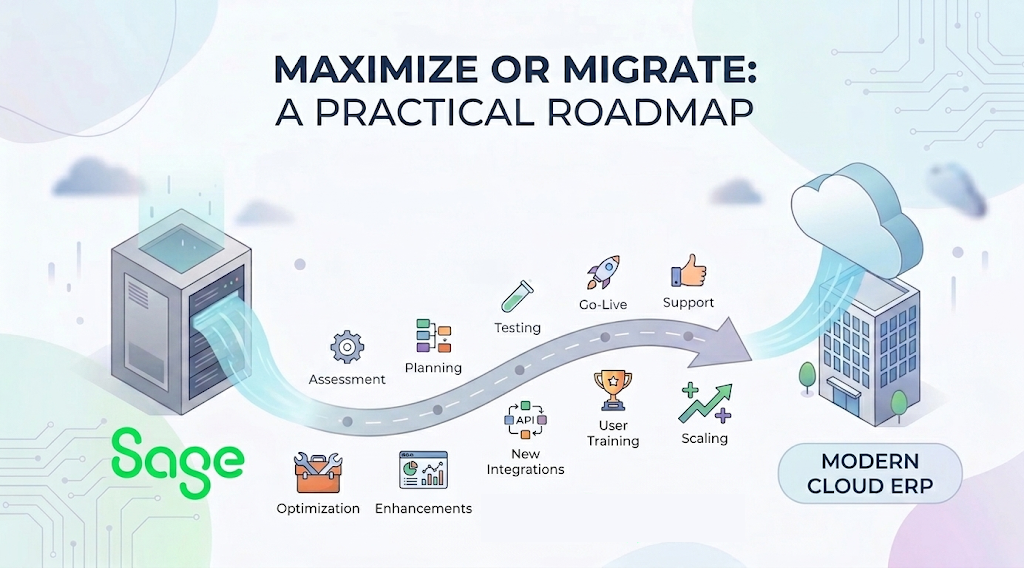
Signs you can still maximize Sage 300 before migrating
Are you maximizing your Sage 300 investment, or is it time to evaluate modern cloud alternatives? Join Crestwood Associates' growth expert Stephanie McColly to discover actionable strategies for scaling your operations, whether that means fine-tuning your existing Sage 300 system or navigating a smart migration to a modern cloud ERP.
Complimentary Webinar
📅 Date: Wednesday, September 23, 2026
⏰ Time: 2 PM ET / 11 AM PT
⏳ Duration: 30 Mins
REGISTER NOW
What We Will Cover:
- Unlocking Unused Sage 300 Power
- Eliminate Spreadsheet Workarounds
- The "Day End" Batch vs. Real-Time Processing Face-Off
- The Reality of Licensing & Risk: An honest look at Sage 300’s predictable per-seat pricing versus Modern Cloud ERP’s consumption model, and how a hybrid cloud deployment might give you the best of both worlds.
In many Sage 300 environments, 60–70% of the pain lives in those gaps rather than in the core ERP configuration. You may discover that your team is printing pick tickets and manually keying receipts because there is no barcoding or scanning in place, not because Sage 300 itself cannot support better workflows.
Next, look at targeted ISV add-ons. Warehouse management, scanning, barcoding, and light manufacturing solutions can sit on top of Sage 300 and dramatically reduce errors, shipping delays, and manual data entry. For example, integrating handheld barcode scanners with Sage 300 gives you real-time inventory updates and eliminates re-keying data from paper count sheets, similar to how handheld devices transform Sage environments described in technical guides for warehouse integrations.
Infrastructure is another lever. If you are still running Sage 300 on aging on-premises servers, you may be fighting hardware limits rather than software limits. Moving Sage 300 to a hosted or private cloud can improve performance, provide remote access, and add managed backups without forcing users to relearn a completely new system. It is not “born in the cloud,” but it can buy you two to five years of stability while you plan a thoughtful migration.
Licensing deserves an honest review. Sage 300’s predictable per-seat licensing can work well when your user count is stable and transaction volume is modest. You know exactly what you pay each year, which can be attractive in low‑margin industries. The trade-off is that adding seasonal or occasional users is costly, which often leads to shared logins or offline workarounds that hurt data quality and auditability.
When Sage 300 becomes a growth ceiling, you can’t ignore
Once your growth exposes structural limits, multi-entity complexity, disconnected systems, and user caps, Sage 300 optimization starts to deliver diminishing returns. At that point, the real question is whether staying on Sage 300 is becoming a hidden growth tax compared to a modern cloud ERP platform built for scalability and real-time visibility.
Look at organizations like Karsten Group, a global fruit distributor that replaced Sage 300 with Acumatica Distribution Edition. They consolidated six disconnected systems into one, eliminated about 2,500 printed invoices per month, and gained instant access to real-time financials across multiple farms and entities, as reported in Acumatica’s Karsten case study (Acumatica). Paper-heavy processes and slow approvals became digital, mobile workflows.
Another benchmark is Cornell Cooperative Extension, a nonprofit with 1,500 employees that struggled with user caps and manual work under its legacy Sage ERP setup. Their Sage environment supported only 56 users, forcing teams onto spreadsheets and shared logins. After moving to Acumatica’s cloud platform, they deployed 65 tenants in six months and scaled to around 1,000 users. Payroll processing dropped from weeks to minutes, and finance leaders could answer questions in real time instead of waiting 24–48 hours, according to published case study data.
These stories reveal a pattern. When your business depends on multi-entity consolidation, mobile approvals, eCommerce, and real-time visibility, a batch-oriented, per-seat licensed system like Sage 300 starts working against you. Customizations pile up. Reporting lags. Integrating one more niche tool into an aging on-prem stack feels too risky, so new initiatives stall.
Modern cloud ERP platforms flip that equation. Licensing is typically based on resource consumption rather than named users, so you can bring more people into the system, operations leaders, plant managers, project managers, and field staff, without blowing up your budget. That broader participation is what makes real-time dashboards meaningful instead of theoretical.
In the webinar, we will show you exactly where “maximize” stops paying off and “migrate” becomes the financially smarter option, using real metrics from companies that have already made the shift.
A clear framework to decide: maximize now, migrate next
To bring structure to the Sage 300 maximize or migrate decision, use a simple four-part scoring model: utilization, complexity, agility, and risk. When you score each area honestly, a clear direction usually emerges, either “optimize and extend Sage 300” or “plan a staged cloud migration” over the next 12–36 months.
Utilization asks how much of Sage 300’s core financials, inventory, and order management you actually use. If you estimate that you are below 60% utilization, there is likely room to improve with better configuration, training, and add-ons. For example, if warehouse staff still rely on Excel for counts and shipping, you are not maximizing the use of your ERP system.
Complexity covers the number of entities, locations, currencies, and integrations you manage. Multi-entity, multi-currency, or heavily regulated environments will hit Sage 300’s limits sooner, as seen in Karsten Group’s struggle to manage 14 farms and 13 entities across disconnected systems. If each new entity needs custom scripts or manual consolidations, that is a red flag.
Agility measures how quickly you can spin up new entities, channels, or programs. Cornell Cooperative Extension’s move from 56 Sage users to around 1,000 cloud ERP users shows how crippling user caps can be when you need to expand rapidly. If launching a new location or eCommerce channel requires months of IT work and new infrastructure, you are paying an agility penalty.
Risk includes both technology and people exposure. Older Sage 300 environments often depend on on-prem hardware, a few internal experts, and email-based approvals. Each is a single point of failure. Compare that with a cloud ERP that delivers role-based security, mobile access, automated workflows, and continuous updates. If auditors are flagging control gaps or leadership cannot get timely numbers, underinvesting in your ERP stack may be riskier than migrating.
What you’ll learn in our Sage 300 “Maximize or Migrate” webinar
In 30 minutes, we will help you turn a fuzzy feeling of frustration into a concrete plan with numbers, timelines, and options tailored to your business.
We will start with “Unlocking Unused Sage 300 Power,” showing how to introduce specialized ISVs for advanced scanning, barcoding, and manufacturing workflows without committing to an ERP replacement.
Next, we will tackle the “Day End vs real-time processing” face‑off. Sage 300’s trusted batch processing model has served manufacturers and distributors for years, but it behaves very differently from cloud ERP’s real‑time processing, especially for cross‑border shipments and multi‑stage production.
We will also unpack the reality of licensing and risk. You will learn how Sage 300’s predictable per‑seat pricing compares to cloud ERP’s consumption‑based models, and how hybrid deployments, running Sage 300 in a private cloud while piloting cloud ERP in one division, can reduce risk. Finally, we will leave time for live Q&A so you can ask pointed questions about your own environment.
If you are a CFO, controller, operations leader, or IT manager responsible for Sage 300, this session will give you language and numbers you can take straight to your next leadership meeting.
How to prepare your team for a low-risk Sage 300 to cloud ERP journey
Whether you ultimately maximize Sage 300 or migrate, preparation is the same: get your data, processes, and people ready. Teams that do this groundwork can reduce migration risk, shorten project timelines, and avoid surprises during implementation.
Start with data. Clean up your Sage 300 master data and chart of accounts, standardize item codes, and retire inactive entities or customers. Companies that enter a cloud ERP project with messy data often spend the first three months cleaning what could have been addressed earlier. Think of this as spring‑cleaning your ERP, with or without migration.
Next, document your core processes with enough detail that another person could follow them: order entry, purchasing, inventory adjustments, production, project accounting, and period-end close. Identify manual handoffs, email approvals, and spreadsheets. Those are the areas where you will either apply Sage 300 add‑ons or redesign workflows in a new system.
Engage stakeholders early. Bring finance, operations, warehouse, and IT leaders into the conversation before you make any final decisions. Use concrete examples, such as how Karsten Group eliminated 2,500 printed invoices per month or how Cornell Cooperative Extension scaled user access by 18x, to explain why change is on the table. When people see tangible outcomes, they are more willing to help.
Finally, benchmark your current KPIs: order cycle time, days to close the month, inventory accuracy, number of manual journal entries, and time to produce management reports. These numbers will become your before‑and‑after story, whether you stay on Sage 300 with improvements or migrate to cloud ERP.
Next steps: from Sage 300 reality check to action plan
By now, you can see that the Sage 300 maximize or migrate question does not have a one-size-fits-all answer. The right move depends on how fully you use Sage 300 today, how complex your operations are, and how much growth and risk your current stack can realistically support over the next few years.
Your immediate next step is simple: perform a quick Sage 300 health check and compare it with what you will learn in our webinar. List your top five pain points, manual work, reporting delays, user caps, compliance issues, or integration headaches, and classify each one as “configuration,” “process,” “add-on opportunity,” or “structural limit.” That alone will clarify whether you are leaning toward maximizing or migrating.
Then, join us for the complimentary “Sage 300: Maximize or Migrate?” webinar on Wednesday, September 23, 2026, at 11 AM PT / 2 PM ET PT. In 30 minutes, we will share real‑world stories, a practical decision framework, and a clear set of next steps. You will leave with a draft roadmap you can refine with your team.
Ready to move from frustration to a plan? Click here to register now, space is limited, and this session is tailored specifically for Sage 300 users who want to turn today’s constraints into tomorrow’s competitive advantage.