
Sage 100 ERP (formerly MAS 90): How to install the new tax table updates
Question: Mike, we own Sage 100 ERP (formerly Sage MAS90), we process payroll. How do we get and install the new tax table updates?
1 min read
Question: Mike, we own Sage 100 ERP (MAS 90). How do we set up Tax Codes for each of the cities we do work in and charge Sales Tax to an Invoice?
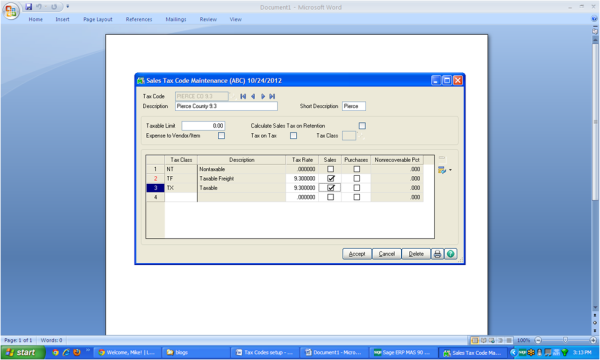
Answer: You can set up Sales Taxes using the Sales Tax Code Maintenance and Schedule Tasks in Library Master. The Sales Tax Code Maintenance enables you to setup for individual jurisdictions, which can then be applied to a Sales Tax Schedule, Customer and then Invoices.
Step 1:
From Modules>Library Master>Setup>Sales Tax Code Maintenance:
a) Enter the Tax Code, Description as well as the Tax Rate and click Accept.
Step 2:
From Modules>Library Master>Setup>Sales Tax Schedule Maintenance.
a) Entry the Tax Schedule name and us the lookup to apply the proper Sales Tax Codes or Codes to the Schedule and then click Accept.
Step 3:
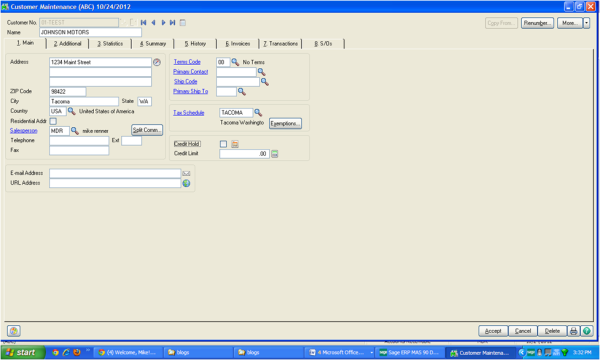
To apply to a Customer:
From Modules>Accounts Receivable>Main>Customer Maintenance:
Select the Tax Schedule on the right side of Tab 1, and click Accept. This will now allow you to apply this Tax Schedule to an Invoice.
Written by Mike Renner, Partner, WAC Consulting, Owner at Computer Accounting Services
Mike is an expert in Sage 100 ERP, with over 25 years of experience in the accounting software industry. Mike is also a Sage Certified Trainer and a recognized leader in the design, implementation and support of ERP systems, including Sage.
Sage 100 ERP (Sage MAS90/200), Sage 100 Fund Accounting (formerly MIP Non Profit Software), Sage Grant Management, Sage Online Fundraising, QuickBooks Enterprise and Point of Sale VAR.

Question: Mike, we own Sage 100 ERP (formerly Sage MAS90), we process payroll. How do we get and install the new tax table updates?
Question: Mike, we own Sage 100 ERP (formerly Sage MAS90), we process Payroll. How do we get and install the W2, 1099 End of Year IRD updates?

Question: Mike, we own Sage 100 ERP (formerly Sage MAS90). What is the Business Objects Interface, how do we get it, and how does it work? Answer:...