Modernize Sage 100: Cloud Hosted, eCommerce and Shipping
Why disconnected Sage 100 systems slow fulfillment and growth Modernizing Sage 100 for faster fulfillment means combining cloud hosting, real-time...
5 min read
To end the QuickBooks spreadsheet dilemma, you need to separate what QuickBooks does well - core accounting- from the operational work it was never built to handle. That means moving production, inventory, and scheduling into a purpose-built cloud ERP while keeping financials accurate and connected.
QuickBooks is excellent at what it was designed for: general ledger, payables, receivables, and basic reporting. The problem appears when a growing manufacturer or distributor leans on it to run everything else. Shop floor schedules, capacity planning, and multi-level bills of material (BOMs) end up living in a web of spreadsheets that sit around QuickBooks, not inside it.
Industry research backs up how common this pattern is. According to an Intuit QuickBooks Small Business Insights survey cited by QuickBooks Canada, 47% of small businesses still use spreadsheets to manage financial information, and 36% say lack of integration between tools creates challenges. For manufacturers, those “tools” often include production schedules and inventory trackers built in Excel.
When each process lives in its own workbook, every change becomes a manual reconciliation exercise. Add a new product line, open a second warehouse, or start selling through a new channel, and the spreadsheet structure has to be rebuilt by hand. At a certain point, the question is no longer whether QuickBooks can post another invoice; it’s whether the spreadsheet layer wrapped around it is sustainable.
If you run a plant tour in a growing manufacturer that still relies on QuickBooks and Excel, the spreadsheet dilemma is visible almost immediately. Supervisors print yesterday’s schedule from a shared workbook, planners keep their own unofficial versions “just in case,” and someone on the team is known as the only person who understands how the formulas work.
On the surface, this can look controlled. But underneath, there are warning signs:
The cost is usually measured in time. For example, if your production planner spends two hours a day reconciling spreadsheets across purchasing, inventory, and the shop floor, that’s 10 hours a week,or more than one full workday,just to keep the plan current. Any late change from a key customer can send them back to the beginning.
In its guidance for manufacturers, QuickBooks Canada notes that disconnected spreadsheets make it harder to track inventory and keep teams aligned on the same numbers. That misalignment is not just an inconvenience; it increases the risk of missed shipments, expedited freight, and quality issues when the wrong revision of a BOM makes it to the floor.
QuickBooks rarely becomes a problem overnight. As Xorosoft points out, growth adds operational layers, new channels, more warehouses, and more data, until the gaps between systems become more painful than the work of changing them. The tipping point often comes when your spreadsheets start to drive business decisions more than your system of record does.
Common signs include:
If two or more of these scenarios sound familiar, you are already carrying operational risk in your spreadsheet layer. The question becomes how long you can continue to do so before that risk turns into a missed regulatory requirement, a failed audit, or a customer you cannot keep.
Moving beyond the spreadsheet dilemma is not about abandoning QuickBooks overnight. It is about introducing a system designed to manage operations end to end, while keeping accounting stable during the transition. A modern cloud enterprise resource planning (ERP) platform connects what your spreadsheets currently handle - production, inventory, purchasing, and quality - into one integrated model.
Practically, that means:
Cloud ERP providers highlighted in resources like The Spreadsheet Dilemma, is it Time to Move Beyond QuickBooks? Typically also bring role-based dashboards, mobile access, and workflow automation. Those capabilities reduce the amount of data you have to move into spreadsheets in the first place.
Spreadsheets will always have a role for analysis and what-if scenarios. The goal is to move them out of the position of “unofficial system of record” and back into the role they were built for: flexible tools for exploring data that is already reliable.
Because ERP failures are well known in the industry, it is reasonable to be cautious about any major system change. The risk is real,but so is the risk of continuing to run your operation on fragile spreadsheets. The safest path is a structured, phased approach that keeps QuickBooks in place while you build out a more robust operational layer.
A typical low-risk roadmap includes:
This is the type of roadmap you will see in practice from experienced manufacturing-focused partners. The objective is not a “big bang” replacement of QuickBooks, but a staged reduction of spreadsheet risk that you can measure and control at each step.
To make this transition easier to evaluate, ERPVAR and Crawford Software are hosting a complimentary webinar, “The Spreadsheet Dilemma – Is it time to move beyond QuickBooks?” on Wednesday, November 4, 2026 at 1 PM ET / 10 AM PT (45 minutes), designed specifically for QuickBooks users in manufacturing and distribution.
During the session, you will see how peers are:
If your team is wrestling with complex Excel models around QuickBooks today, this 45-minute investment can help you separate short-term spreadsheet fixes from long-term operational strategy. You will leave with questions to bring back to your team, example scenarios to benchmark against, and a clearer picture of what a realistic, low-risk move beyond QuickBooks might look like.
To register, simply complete the short form on the event page with your first name, last name, email, company name, phone number, and current ERP or accounting system. From there, you can decide, based on a more complete understanding, whether it is time to resolve the spreadsheet dilemma in your own organization.
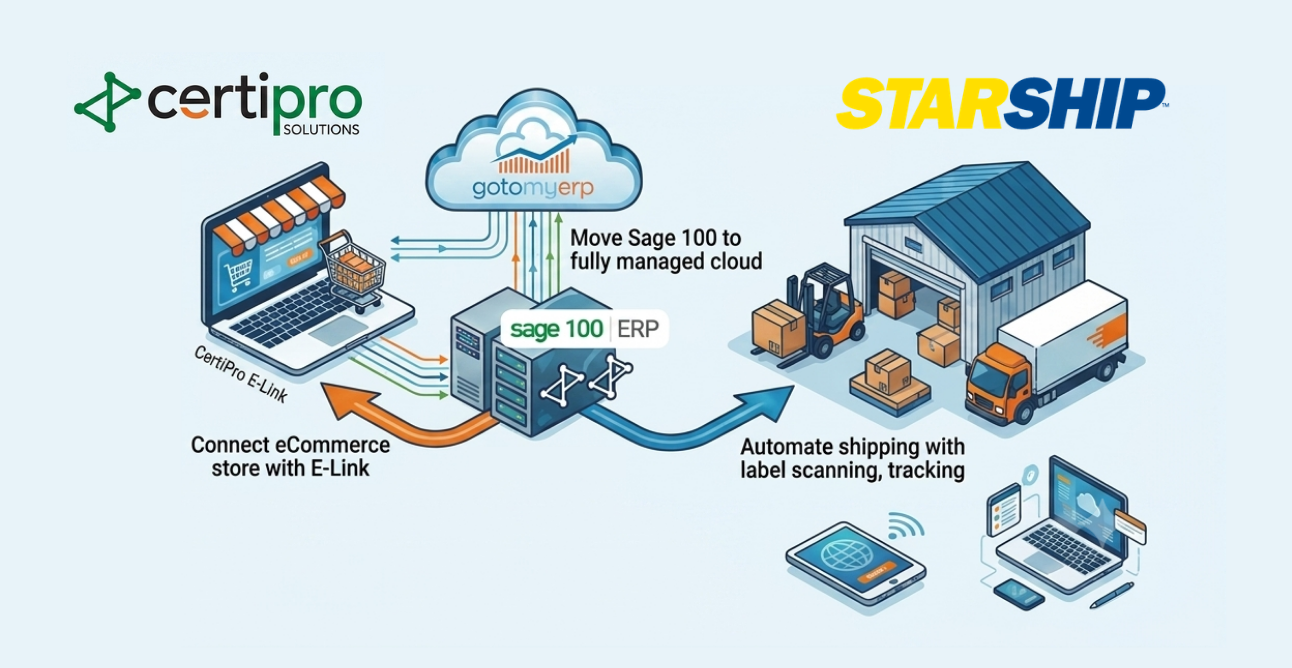
Why disconnected Sage 100 systems slow fulfillment and growth Modernizing Sage 100 for faster fulfillment means combining cloud hosting, real-time...