Signs your Accounting Software is Crippling Your Operations
Why QuickBooks and spreadsheets break for growing operations To end the QuickBooks spreadsheet dilemma, you need to separate what QuickBooks does...
4 min read
Many finance leaders know their ERP is aging, but the real warning sign is not the software version; it is the growing maze of spreadsheets wrapped around it. Pain point: you are stuck on Dynamics GP, Sage, or Macola, drowning in manual workarounds every month-end, yet a full ERP replacement feels risky and overwhelming.
Complimentary Webinar
Date: November 18, 2026
Time: 11 AM PT / 2 PM ET
The legacy ERP spreadsheet trap happens when finance teams rely on dozens of offline Excel workarounds to fill gaps in aging systems like Dynamics GP or Sage. It slows month-end close, hides risk, and blocks real-time insight. To escape, you need connected data, automation, and a clear migration plan.
If that sounds familiar, you are not alone. Many mid-market organizations invested in solid on-premise systems years ago, Dynamics GP, Sage 100, Sage 300, Sage 50, Macola, and then grew faster than the software did. Each time the ERP could not handle a requirement, someone added another spreadsheet: a separate workbook for revenue by region, a manual deferred revenue schedule, a shared file tracking intercompany eliminations. Over time, those quick fixes became the real system of record.
Industry research backs this up. A 2026 study of U.S. mid-market ERP decision-makers found that 91% need four or more days to close their books, and 68% lose 11+ hours every week to manual reconciliation across disconnected systems. That is the spreadsheet trap in numbers. Check out the Best QuickBooks Alternative for Growing Businesses in 2026.
If you run an on-prem ERP, month-end likely means spreadsheets for just about everything. The system may not store all the operational data you need, or reports run slowly, or it is too hard to change the chart of accounts. So your team exports data into Excel, adds manual adjustments, and stitches together the real story of the business.
Data from DataHub Pro’s 2026 close statistics shows that 94% of finance teams still use Excel in the close, and half say spreadsheets are a primary reason the close is slow. Picture a controller in a manufacturing company running Macola: they manage 40 interconnected workbooks with VLOOKUPs and macros to consolidate entities, reconcile inventory, and track project margins. If one file breaks or a key employee is out, closing the books can grind to a halt.
Legacy ERP platforms were never designed for real-time, self-service analytics or automated workflows across CRM, eCommerce, and operations. To answer basic questions, “What was gross margin by product line last month?” or “How did that customer’s open orders change after the price update?”, you are forced to export, combine, and reformat data manually. The heavier your spreadsheet layer becomes, the more fragile your close.
Spreadsheets are flexible, but at scale they become an invisible tax on the business. The APQC benchmark puts the median monthly close at 6.4 days, with top performers at 4.8 days or less (APQC via DataHub Pro). If your Dynamics GP or Sage 100 close routinely takes seven to ten days, that delay is not just an inconvenience, it is a structural drag on decision-making.
Modern cloud ERP platforms are designed to eliminate exactly this kind of spreadsheet sprawl. Instead of relying on offline workbooks, finance and operations share a single, real-time data model. Transactions flow from CRM and eCommerce through inventory, projects, and the general ledger without manual rekeying or nightly batch jobs.
In practice, that means your month-end close looks very different. Revenue recognition schedules, allocations, and multicurrency revaluations are handled by the system, not by complex Excel templates. A mid-market services firm that moved from Sage 300 to a modern cloud ERP cut its monthly close from eight days to three, simply by automating reconciliations and consolidations that used to live in 20+ spreadsheets.
Self-service dashboards replace one-off report requests. Department heads can see their P&L, open orders, and project profitability in real time without waiting for accounting to email a workbook. Built-in audit trails show who changed what and when, so you no longer need to rebuild evidence for auditors from scratch. The net result: finance spends more time advising the business and less time nursing spreadsheets.
Even when leaders agree the legacy ERP spreadsheet trap is unsustainable, the fear of a disruptive migration can stall progress. The good news is that you do not need a risky “big bang” to modernize. A structured, phased approach can reduce risk while delivering quick wins.
For example, many Dynamics GP or Sage 100 customers begin by modernizing a single process, such as automating revenue recognition or project accounting, while keeping core financials stable. One manufacturer running Macola started with a pilot entity in a new cloud ERP, ran it in parallel for two closes, and only then rolled out the new system to additional entities. That pilot phase surfaced data quality issues early without putting the whole business at risk.
A practical migration blueprint typically covers three areas: data (what is moved, cleansed, or archived), processes (what can be standardized or improved), and people (how to train and support end users). With the right partner and plan, organizations routinely transition off legacy ERP within months, not years, and see measurable gains, like shaving three days off the close, after the very first go-live.
Getting out of the spreadsheet trap starts with understanding where you are today and what a better future could look like for your specific ERP. That is why ERPVAR and Crestwood are hosting a complimentary 45-minute webinar series on Wednesday, November 18, 2026, at 2 PM ET / 11 AM PT, tailored to users of Dynamics GP, Sage 100/300/50, and Macola. Register here: The Spreadsheet Trap: How to Eliminate Manual Workarounds
In each session, “The Dynamics GP Spreadsheet Trap,” “The Sage 100/300/50 Spreadsheet Trap,” and “The Macola Spreadsheet Trap”, experts will break down the true cost of offline models, show live examples of automated cloud workflows, and walk through a concrete migration blueprint. If you currently spend more than four days closing the books or rely on dozens of manual spreadsheets, you will see exactly what operational liberation can look like.
You will leave with a checklist to assess your own close, questions to ask potential ERP partners, and a realistic path to replace your legacy on-premise system without disrupting day-to-day business. Stop managing spreadsheets. Start managing growth, and use this webinar series as your low-risk first step.
Why QuickBooks and spreadsheets break for growing operations To end the QuickBooks spreadsheet dilemma, you need to separate what QuickBooks does...

Educational Webinar Date: Thursday, March 12th, 2026 Time: 11 AM PT / 2 PM ET - 1 hour REGISTER NOW
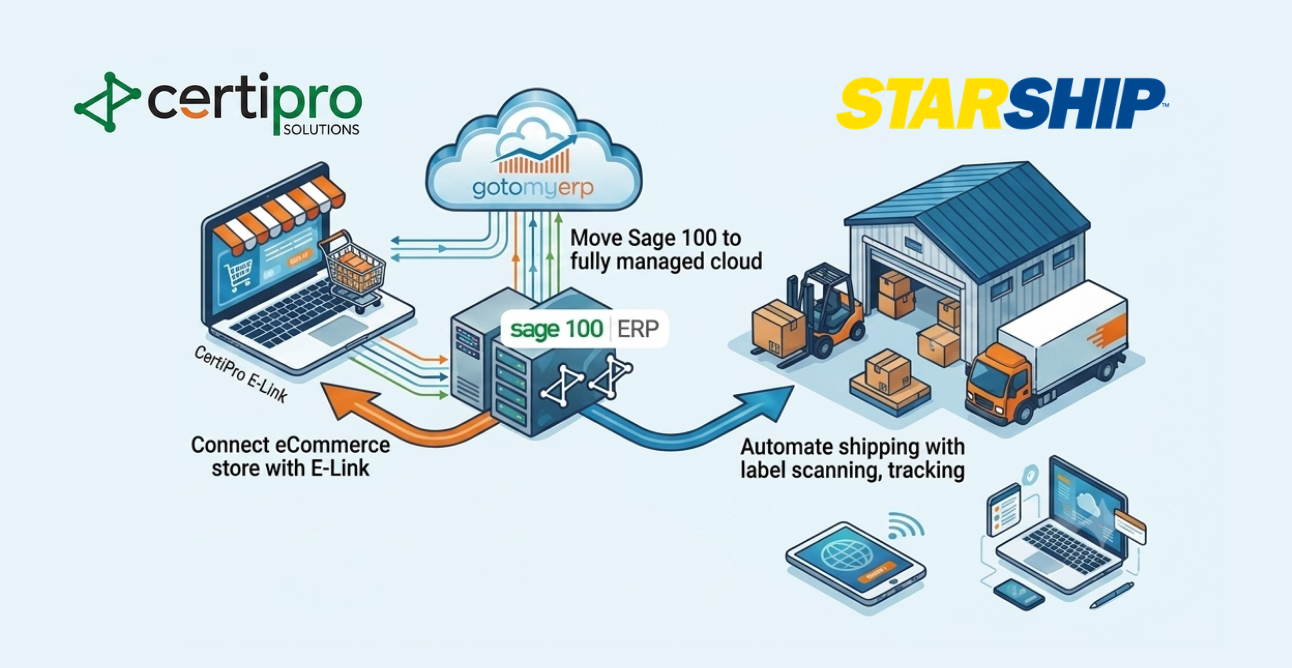
Why disconnected Sage 100 systems slow fulfillment and growth Modernizing Sage 100 for faster fulfillment means combining cloud hosting, real-time...