
Sage 100 ERP: How to make a backup of your company data
Question: Mike, we own Sage 100 ERP (formerly Sage MAS90). How do we make a backup of our Sage 100 ERP company Data?
2 min read
Question: Mike, we own Sage 100 ERP (formerly Sage MAS90). How and why should we be concerned about doing a cloud-based backup of our accounting data? We have a USB thumb drive already?
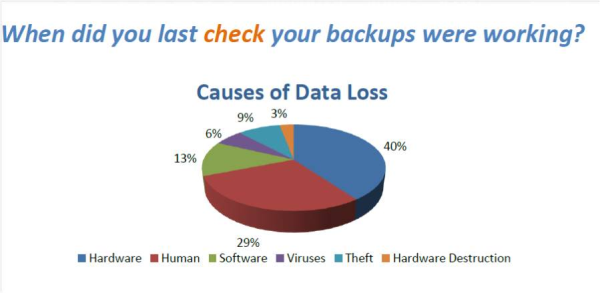
Answer: The graphic below can help explain some of the reasons for doing a cloud based backup:
Top Reasons to backup your Sage 100 ERP data in the cloud:
We have been working with accounting clients for over 25 years, some companies have great IT departments and have built in redundant backup systems and might still want to consider cloud based for their accounting data. The cloud based backup allows the data to be backed up on the cloud with normally two or three redundant locations, so in-case of a fire, flood, power outage or some other unknown the backup data will always be available.
In one recent case, a client of ours had a complete meltdown of their computer hardware, and we were able to restore the data to a new computer and get them back in business in a matter of minutes.
Another benefit is that most cloud-based backup systems allow 30 days of data availability. So let’s say you are doing a payroll and posted something incorrectly, and wanted to start over before the update. You could always restore back to a day or two ago and be able to get back to where you started before the mistake.
Finally, we have worked with Divinsa for several years. Most Sage 100 ERP users have accounting data in the range of 1-2 GB, which can be easily backed up for a fee of $25-$35 per month, a real deal.

Mike is an expert on Sage 100 ERP with over 25 years in the accounting software industry. Mike is also a Sage Certified Trainer and a recognized leader in the design, implementation and support of ERP systems, including Sage.
Sage 100 ERP (formerly Sage MAS90/200), Sage 100 Fund Accounting (formerly MIP Non Profit Software), Sage Grant Management, Sage Online Fundraising, QuickBooks Enterprise and Point of Sale VAR.
Question: Mike, we own Sage 100 ERP (formerly Sage MAS90). How do we make a backup of our Sage 100 ERP company Data?
Question: Mike, we own Sage 100 ERP (formerly Sage MAS90) and we also own an Apple Mac. We would like to be able to connect the MAC to the Sage 100...

Question: Mike, we own Sage 100 ERP (formerly Sage MAS90). I changed banks, and now when I print checks, it posts to the wrong GL Account. Why?